When revising contracts, engineering schematics, or legal filings, catching subtle edits across document revisions is critical. OmniTool Hub's PDF Document Compare tool combines side-by-side synchronized canvas scrolling, sub-pixel graphic diff heatmaps, and Myers text stream comparison to ensure no unauthorized clause, altered dimension, or deleted paragraph slips past unnoticed.
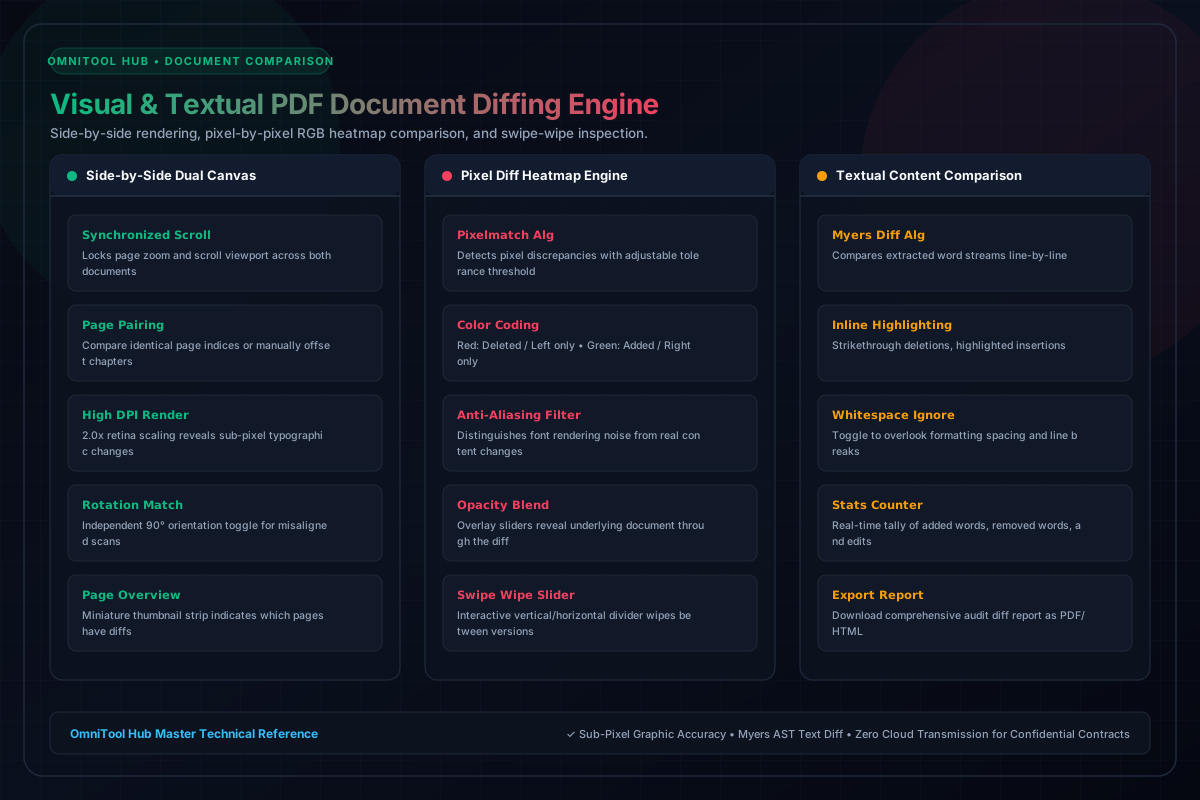
Comparison & Inspection Modes
Here is a detailed breakdown of the capabilities, algorithms, and configurations available within this tool suite:
Scrolls and zooms both document versions simultaneously. Page pairing controls allow matching offset chapters or inserted pages.
Runs pixel-by-pixel RGB comparison across canvas renders. Deleted elements glow red, added elements glow green, and unchanged regions remain muted.
Overlays both documents and provides an interactive divider handle to wipe back and forth, spotting minor layout shifts instantly.
Extracts underlying text streams and runs word-by-word diffing, displaying clean green insertions and red strikethrough deletions.
Step-by-Step Usage Guide
- Upload Document A (Original / Baseline) and Document B (Modified / Revision).
- Navigate to the page you wish to inspect using the page selector.
- Switch between **Side-by-Side**, **Heatmap Diff**, **Swipe Slider**, and **Text Diff** views.
- Adjust diff sensitivity threshold to filter out minor printer anti-aliasing artifacts.
- Export a comprehensive visual audit report summarizing all detected discrepancies.