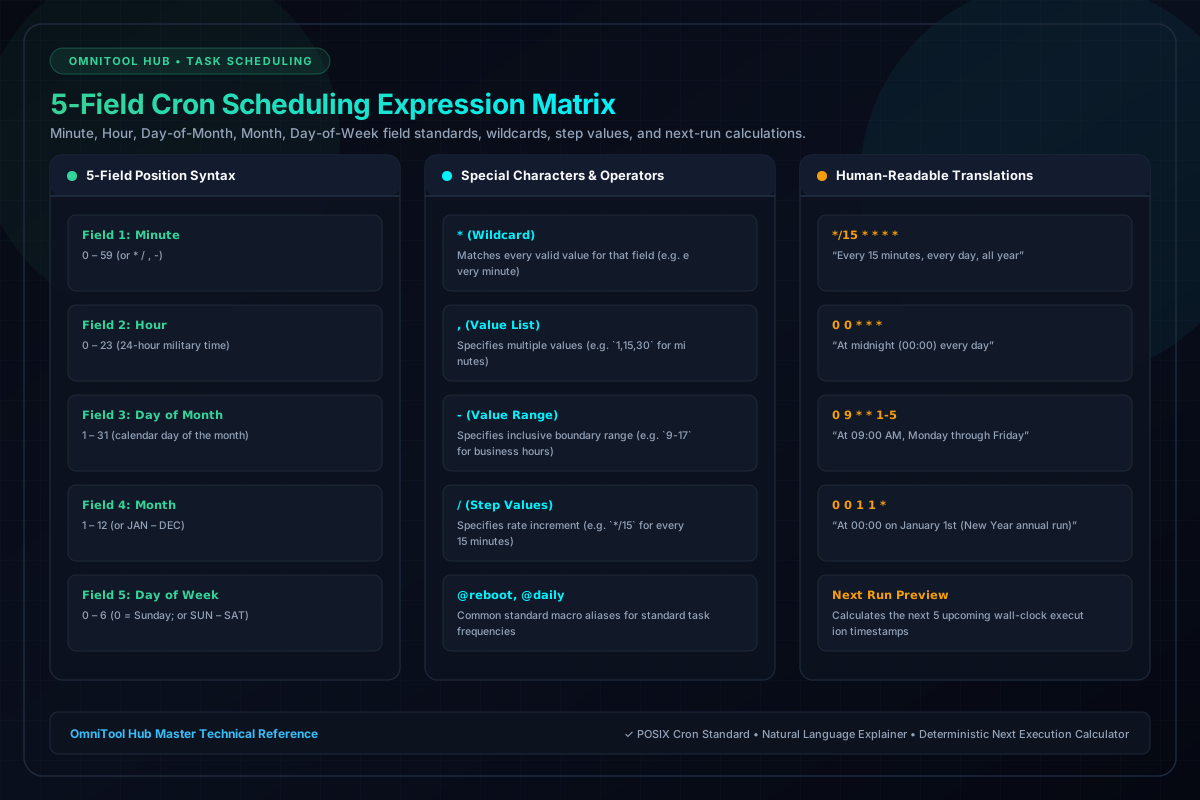
Cron expressions are the standard syntax for scheduling automated cron jobs, server backups, and batch pipelines across Linux, AWS CloudWatch, and Kubernetes. OmniTool Hub's Visual Cron Expression Builder eliminates cron syntax guesswork with an interactive 5-field designer, natural language translations, and deterministic upcoming execution timestamps.
Builder & Verification Capabilities
Here is a detailed breakdown of the capabilities, algorithms, and configurations available within this tool suite:
Easily configure Minutes (0-59), Hours (0-23), Day of Month (1-31), Month (1-12), and Day of Week (0-6) with interactive sliders and checkmarks.
Translates cryptic strings like `*/15 9-17 * * 1-5` into human-readable English: 'Every 15 minutes, between 09:00 AM and 05:59 PM, Monday through Friday'.
Calculates the exact calendar dates and wall-clock times for the next 5 upcoming executions in your local time zone.
1-click shortcuts for common schedules: every hour, daily midnight backup, weekly audit, end of month, or business days only.
Step-by-Step Usage Guide
- Select interval parameters using the visual tabs (Minutes, Hours, Days, Months).
- Watch the cron string update dynamically in the primary formula bar.
- Verify the plain-English explanation below the expression.
- Check the **Upcoming Runs** list to confirm the schedule triggers at intended dates and times.
- Copy the validated cron string or crontab command line directly to your clipboard.