OmniTool Hub's AI PDF Summarizer & Translator revolutionizes document review by delivering high-density executive briefings, key entity extraction, and multilingual translation directly in your browser. Engineered with client-side NLP and Web Worker text parsing, it processes multi-hundred-page research papers, financial reports, and contracts with total privacy and zero cloud transmission.
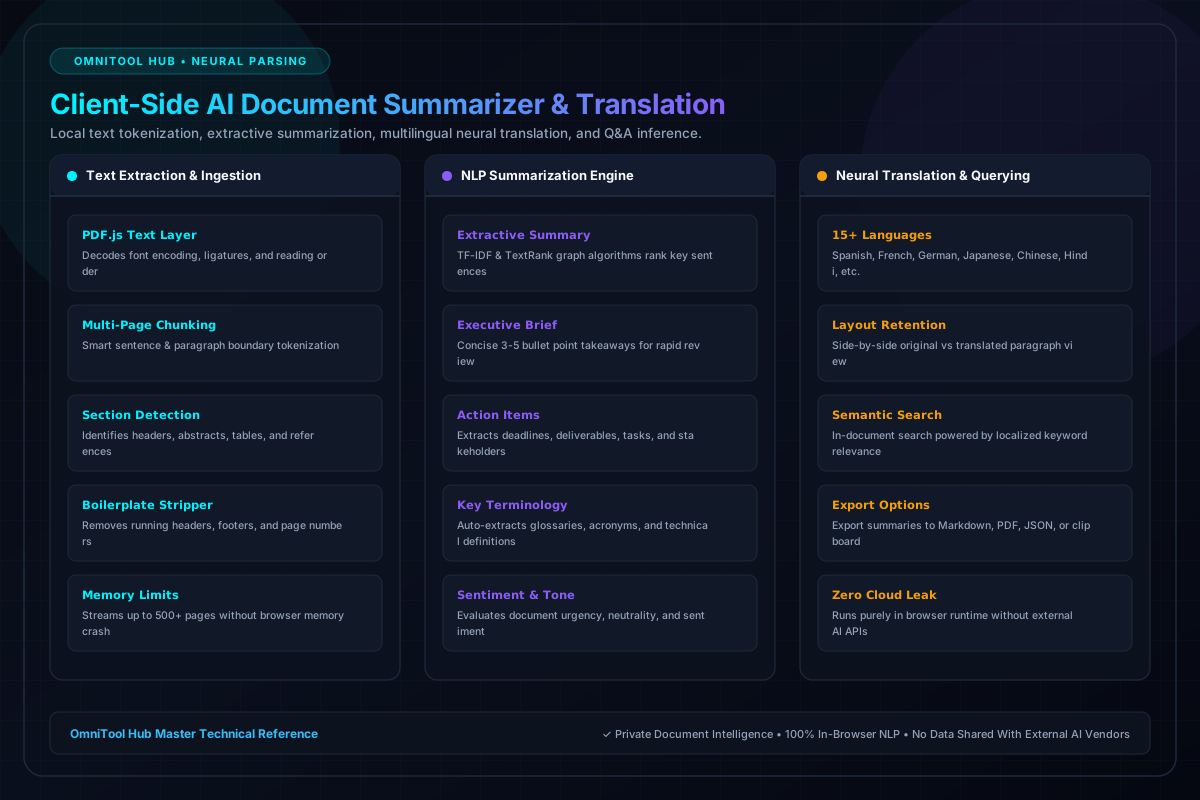
Document Intelligence Capabilities
Here is a detailed breakdown of the capabilities, algorithms, and configurations available within this tool suite:
Condenses complex multi-page documents into 3-5 punchy executive bullet points, summarizing thesis, findings, and overall conclusions.
Automatically extracts contractual obligations, project milestones, task assignments, and calendar deadlines buried in document prose.
Translates PDF text sections into Spanish, French, German, Japanese, Chinese, Hindi, Arabic, and more with side-by-side alignment.
Ask targeted questions about specific clauses, numerical figures, or regulatory citations and receive instant referenced answers.
Step-by-Step Usage Guide
- Drop your PDF document into the AI Summarizer drop zone.
- Select your analysis goal: **Executive Brief**, **Full Summary**, **Action Items**, or **Translate**.
- Choose your target language if running translation.
- Click **Analyze Document** to process text tokens in real time.
- Review the synthesized breakdown, copy markdown notes, or export a formatted summary report.