OmniTool Hub's Document & PDF Converter Hub is a unified powerhouse for transforming common office documents, spreadsheets, slides, photos, and web content into ISO-compliant PDF files. Operating 100% in-browser via WebAssembly and HTML5 Canvas, your proprietary financial models, confidential legal contracts, and personal documents never touch a third-party server.
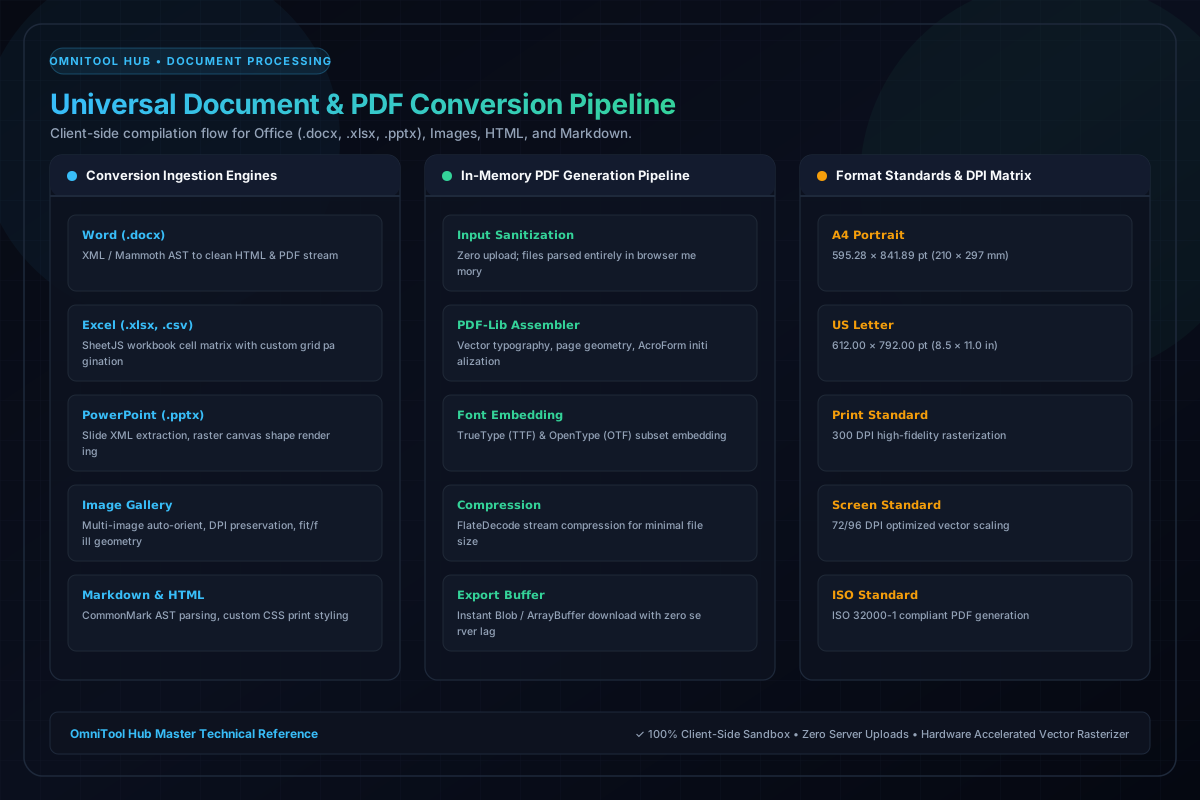
Supported Document Conversion Engines
Here is a detailed breakdown of the capabilities, algorithms, and configurations available within this tool suite:
Parses OpenXML Word document hierarchies, tables, inline images, and typography directly into formatted PDF streams without needing Microsoft Office.
Transforms workbook sheets, formula cell values, numerical data grids, and CSV matrices into clean paginated PDF landscape or portrait reports.
Renders slide text boxes, vector shapes, layout geometries, and visual presentations into slide-by-slide PDF documentation.
Batch compiles JPG, PNG, and WebP captures into multi-page PDFs with auto-orientation, margin adjustments, and DPI preservation.
Converts structured Markdown or custom styled HTML/CSS code directly into clean printable PDF documents with syntax highlighting.
Step-by-Step Usage Guide
- Select your target conversion engine tab (e.g., Word, Excel, Images, or Markdown).
- Drag and drop your source files into the drop zone or paste raw markup content.
- Adjust page orientation (Portrait vs. Landscape), margin spacing, and paper size (A4 vs. US Letter).
- Click **Compile to PDF** to execute in-memory rasterization and binary assembly.
- Preview the generated document and click **Download PDF** to save instantly.