OmniTool Hub's PDF Editor Studio provides professional desktop-grade markup, form filling, and digital signing capabilities directly inside your web browser. Built on non-destructive vector canvas layers with permanent destructive redaction, it lets you sign leases, fill tax forms, annotate design proofs, and redact confidential data without expensive Adobe Acrobat subscriptions.
Integrated Editor & Annotation Tools
Here is a detailed breakdown of the capabilities, algorithms, and configurations available within this tool suite:
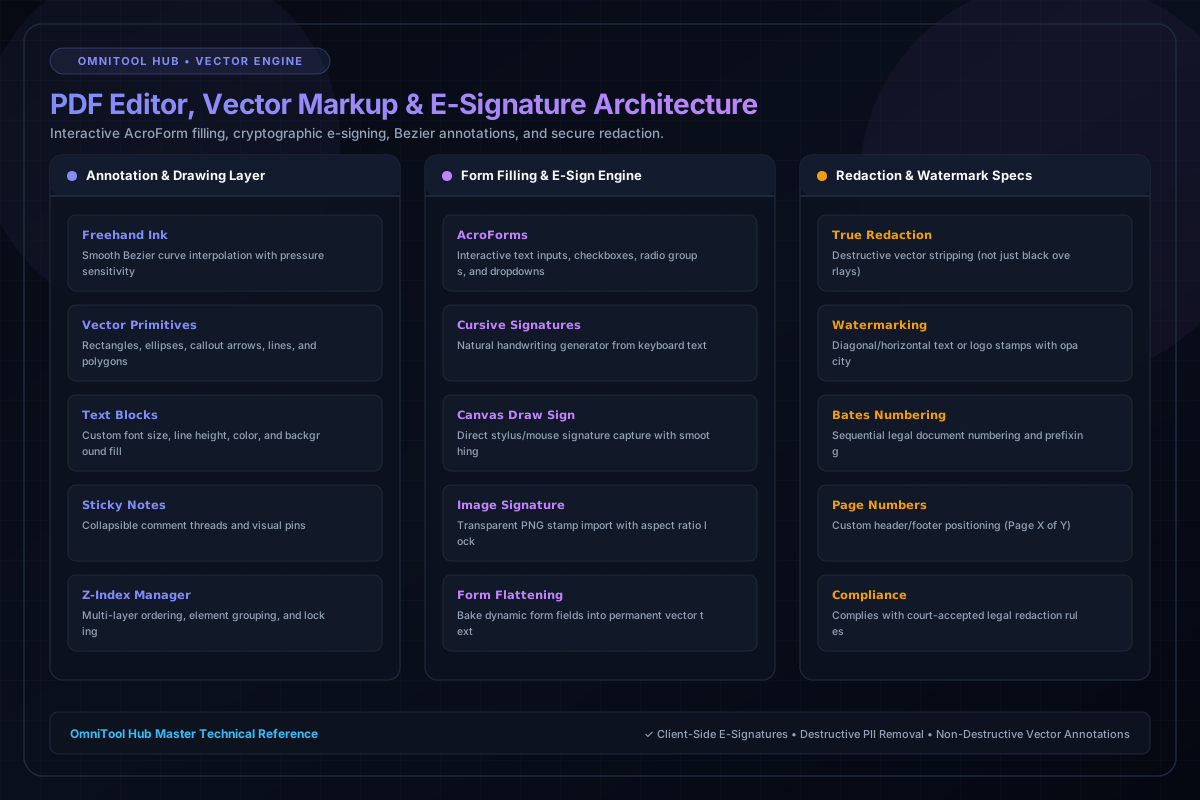
Generate fluid cursive signatures from typed text, draw by hand with mouse/stylus smoothing, or upload transparent PNG stamp signatures.
Add rectangular highlight boxes, arrows, freehand ink, strikethroughs, sticky note pins, and custom text callouts with adjustable opacity.
Detects standard PDF AcroForm fields automatically. Fill text inputs, toggle checkboxes, select radio options, and permanently flatten forms.
Stamp customized diagonal confidentiality watermarks (e.g. 'CONFIDENTIAL', 'DRAFT') and dynamic 'Page X of Y' headers and footers.
Permanently strips underlying vector text and raster pixels beneath redaction boxes, preventing data leakage from highlight-and-copy attempts.
Step-by-Step Usage Guide
- Open your target PDF file in the editor canvas.
- Select an editing mode from the top toolbar (Draw, Sign, Text, Redact, or Form Fill).
- Click or drag on the document page to position annotations, signatures, or redaction blocks.
- Customize properties such as line thickness, font size, stroke color, and opacity in the inspector panel.
- Click **Export Edited PDF** to bake changes and download your completed file.