OmniTool Hub's PDF Security Suite provides enterprise-class cryptographic protection, automated structural repair, and long-term archival standardization. Whether securing sensitive financial audits with military-grade AES-256 passwords, repairing unreadable PDFs with damaged cross-reference streams, or meeting ISO 19005 legal archival mandates, all cryptographic operations execute locally in memory.
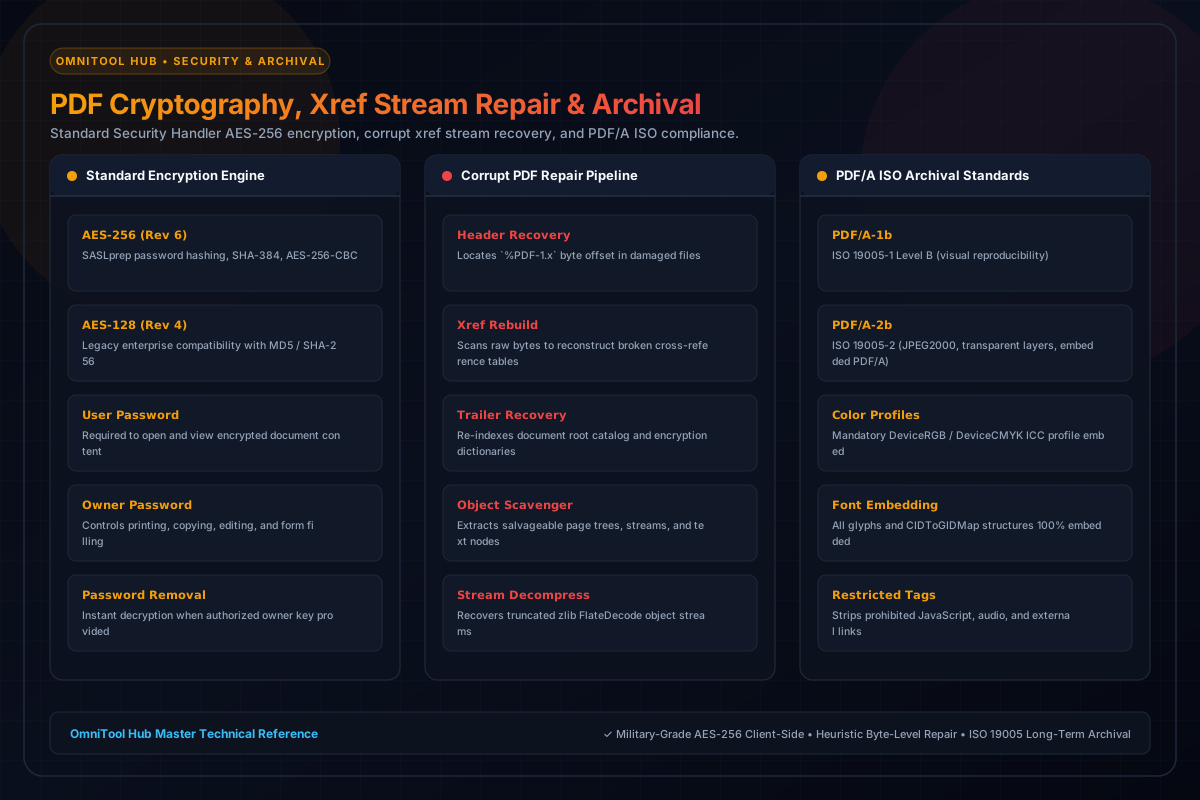
Core Security & Maintenance Engines
Here is a detailed breakdown of the capabilities, algorithms, and configurations available within this tool suite:
Encrypts documents with Standard Security Handler Revision 6 (AES-256) or Revision 4 (AES-128). Configure separate User and Owner master passwords.
Control document rights: restrict high-resolution printing, disallow content copying, disable page modifications, and prevent form extraction.
Scans damaged, truncated, or unreadable PDF files byte-by-byte to reconstruct missing cross-reference tables and recover stranded page trees.
Converts documents to PDF/A-1b and PDF/A-2b standards, embedding mandatory device color profiles and fonts while purging non-compliant active scripts.
Step-by-Step Usage Guide
- Select **PDF Security & Passwords**, **Corrupt PDF Repair**, or **PDF/A Archival** tab.
- Upload your PDF document into the client-side sandbox.
- Configure your encryption passwords and permission checkboxes, or choose PDF/A conformance level.
- Click **Process Document** to execute cryptographic hashing or xref table reconstruction.
- Download your hardened, recovered, or archival-ready PDF instantly.