Animated GIFs remain the universal format for software demonstrations, GitHub README documentation, social media memes, and email marketing. OmniTool Hub's Video to Animated GIF Converter converts MP4, WebM, and MOV videos into optimized GIFs using NeuQuant color quantization, Floyd-Steinberg dithering, and LZW byte compression directly in your browser.
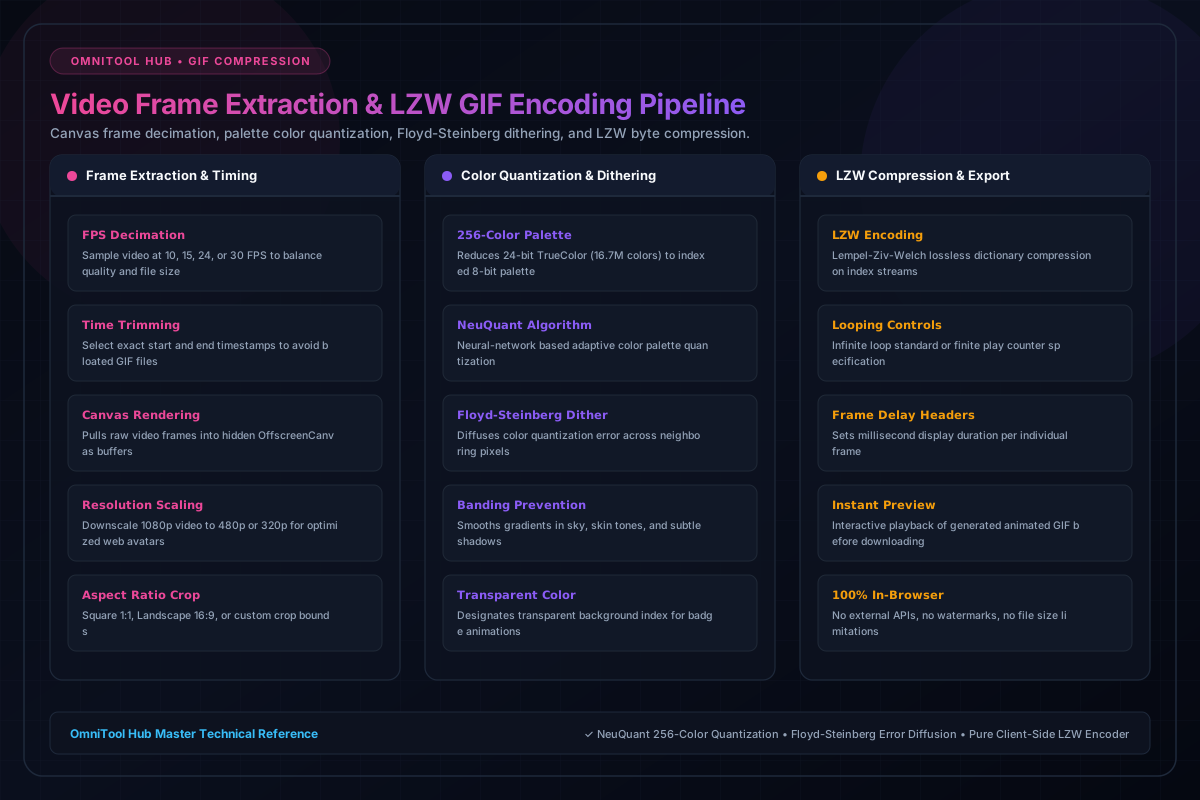
Conversion & Optimization Features
Here is a detailed breakdown of the capabilities, algorithms, and configurations available within this tool suite:
Select exact start and end timestamps to capture only the relevant snippet, avoiding bloated multi-megabyte GIF files.
Downscale heavy 1080p videos to web-optimized 480p or 320p resolutions and select 10, 15, or 24 FPS for smooth motion.
Neural network-based color quantization extracts the optimal 256-color palette tailored to your video's specific scene.
Smooths color transitions and eliminates banding artifacts across gradients, skies, and shadows.
Step-by-Step Usage Guide
- Upload your video file (MP4, WebM, MOV) into the conversion studio.
- Use the range sliders to trim the video down to your desired snippet.
- Choose output resolution (e.g. 480px, 320px) and frame rate (10, 15, or 24 FPS).
- Click **Generate Animated GIF** and watch the in-browser rendering progress bar.
- Preview the animated loop and click **Download GIF** to save.